Line is a popular instant messaging app which lets you exchange messages over the Internet. You can also make free voice and video calls using Line on mobiles and tablets. If you have not installed Line on Android yet, you should see our guide on installing and configuring Line on Android.

Add friends in Line app in Android

So you have created backups of Line chats on your Android phone. Now, you want to restore those chats on a new device or on a fresh installation of Line app. If you have created your Line chat backups using the Backup All option, then it can be imported using the steps shown in this guide.

Tap on Chats then tap on a contact

Without registering your email, Line app allows you to use almost all of its basic features on your smartphone or tablet. You can add friends, send messages, make voice and video calls, etc. However, email registration is needed for some activities like using Line messenger on your PC.

Tap on More then tap on Settings in Line

If you use one Line account on more than one mobile phone or tablet, the chat history on the previously used device is deleted. You can backup your Line chat history on your Android phone using its feature called Backup Chat History. This feature lets you create backups of your chats in Line messenger that you can restore later.

Tap on the chat you want to backup

You want to delete Vine account on your Android phone. Perhaps after deleting your existing Vine account, you want to create a new account or maybe you don't want to share Vine videos for sometime. Whatever be the reason, if you have decided to delete your Vine account, just follow the simple steps in this guide below.

Tap on profile picture icon in the top menu bar

You are using Line messenger for some time and now you want to change its default chat wallpaper. Line app comes with a bunch of wallpapers to choose from. However, you are not limited to the wallpapers included with Line.

Tap on More then tap on Settings

If you are using Line messenger on your Android device for some time now, you must have noticed that there is no logout option. If you want the logout feature just to make sure that nobody except you can access your private information such as chat history, friends list, etc.

Tap on Settings in More options in Line

Logout is a necessary feature for any instant messaging or social networking apps. Nobody wants to keep their smartphones, tablets, and other mobile devices always logged into social networking apps. You would like to logout of instant messaging apps to prevent others from looking into your chat records and to keep other information private.

Tap on Applications in Android Settings

You want to deactivate your Twitter account. Perhaps you want to take a break from Twitter or maybe you are fed up with some tweet spammers. Whatever be the reason, you should know some important points about what happens when you deactivate your account in Twitter.

Deactivate your account in Twitter account settings page

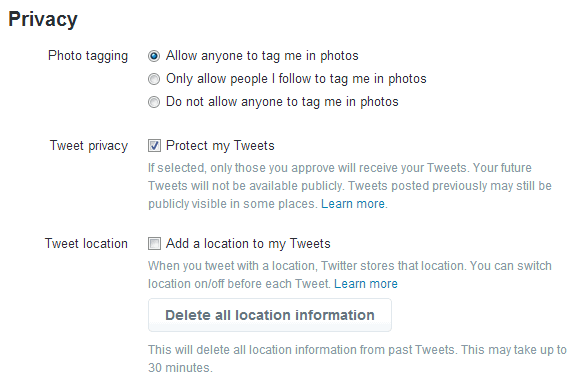
When you sign up for a Twitter account, the default account settings allow anyone, whether or not they have a Twitter account, to view your profile, follow you, and see your tweets. If you want, you can make your Twitter account private so that only those Twitter users who are approved by you can follow you and see your tweets.

Protect tweets in Twitter

Pages

McAfee APAC

Latest Videos